> For the complete documentation index, see [llms.txt](https://docs.thewalletcrew.io/llms.txt). Markdown versions of documentation pages are available by appending `.md` to page URLs; this page is available as [Markdown](https://docs.thewalletcrew.io/connectors/marketing-automation.md).
# Marketing automation
Connect marketing automation platforms (Actito, Klaviyo, SFMC, Adobe Campaign, etc.) to Apple Wallet and Google Wallet passes for issuance, updates, and notifications.
Apple Wallet and Google Wallet passes are designed for real-world moments. They show up in-store, at venues, and in pre‑purchase and post‑purchase journeys. They stay available on a customer’s device, which makes them persistent by default.
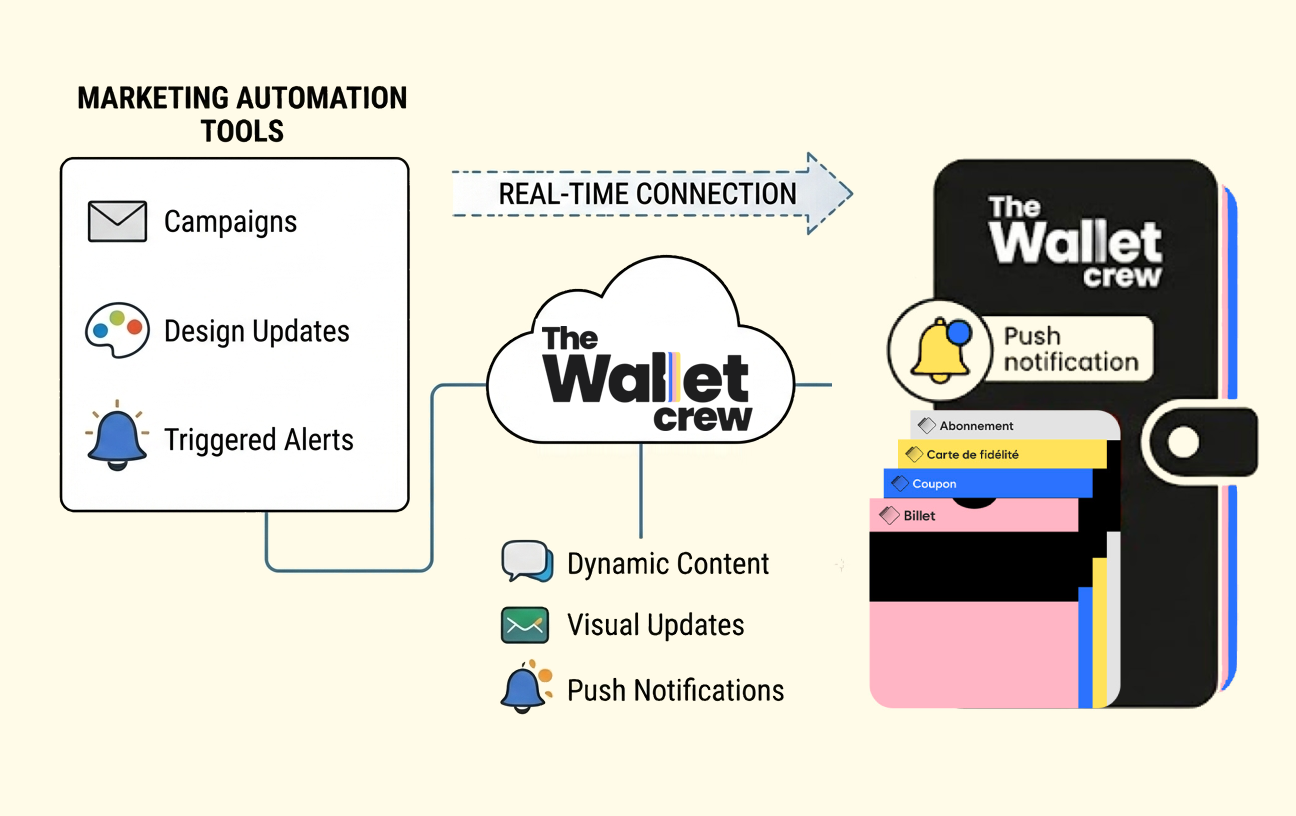
Marketing automation platforms already orchestrate customer journeys. The Wallet Crew connects those workflows to wallet passes, so pass issuance, pass updates, and wallet notifications can be driven from existing tools instead of a separate wallet-only system.
Marketing automation remains the orchestration layer. The Wallet Crew runs the wallet-side work.
Real-world examples
* **Retail loyalty**: update points after checkout, then notify when a reward unlocks.
* **Event access**: push a last-minute gate or schedule change to all tickets.
* **Gift cards**: refresh balance after redemption so the stored value stays accurate.
* **Membership**: update status and expiry on renewal without reissuing the pass.
## Why Apple Wallet and Google Wallet work well with marketing automation
Wallet passes are not a standalone feature. They are an interactive object connected to the brand’s wider IT ecosystem. A pass can surface data coming from CRM, POS, ticketing, or loyalty systems, while still being readable and usable in a physical context.
In that setup, marketing automation typically remains the orchestration layer. It decides the audience, timing, and message. The Wallet Crew executes the wallet-side work and ensures Apple Wallet and Google Wallet receive the updates reliably.
### Real-time control from existing tools
The Wallet Crew supports real-time updates from marketing automation platforms through connectors and APIs. Common operations include updating pass fields, writing campaign messages, adjusting template-driven visuals (colors, images, branded elements), and triggering wallet notifications.
This keeps wallet embedded in existing operations. Teams can run campaigns and lifecycle journeys where they already work, while The Wallet Crew handles signing, delivery, and platform-specific constraints.
{% hint style="warning" %}
Wallet notifications can be transactional or marketing. Marketing messages usually require an explicit opt-in and proof of consent.
Notification delivery depends on wallet platform behavior and pass settings.
{% endhint %}
### Key benefits
This approach reduces operational overhead and keeps wallet aligned with campaigns.
* **Operational simplicity**: no separate wallet management system to run.
* **Real-time updates**: messages, content, and notifications can change instantly.
* **Consistent brand experience**: passes stay in sync with design and campaign intent.
* **Holistic engagement**: wallet is treated as part of the end-to-end customer experience, not an isolated channel.
## Integration options (connectors, API, SFTP)
Connectors are not the only way to integrate marketing automation with wallet passes. The Wallet Crew also supports direct API calls and SFTP flat-file transfers, which works well when the marketing automation platform cannot run custom connector logic.
### Available connectors
A connector typically exposes wallet actions directly inside the marketing automation tool. This is the most common setup for issuing passes, updating fields, and triggering wallet notifications from scenarios.
The Wallet Crew maintains ready-to-use connectors for common marketing automation platforms.
* [Actito](/connectors/marketing-automation/actito.md)
* [Adobe Campaign](/connectors/marketing-automation/adobe-campaign.md)
* [Batch.com](/connectors/marketing-automation/batch.com.md)
* [Bloomreach](/connectors/marketing-automation/bloomreach.md)
* [Brevo](/connectors/marketing-automation/brevo.md)
* [Klaviyo](/connectors/marketing-automation/klaviyo.md)
* [Salesforce Marketing Cloud](/connectors/marketing-automation/salesforce-marketing-cloud.md)
### Marketing automation platforms not listed
An unlisted platform can become a standard connector. The Wallet Crew and the platform partner jointly scope that option when the integration can support multiple brands.
For tenant-specific requirements, use a [custom connector](/connectors/custom-connector.md). Tenant scripting can call the platform API and trigger wallet operations.
### API
Any marketing automation platform that can call HTTPS endpoints can integrate through The Wallet Crew API. This approach is commonly used to create passes, update pass data, and trigger notifications from workflow steps.
### SFTP flat files
When workflows are batch-oriented, or when exporting data from an internal data warehouse, pass updates can be delivered as CSV files over SFTP. The Wallet Crew processes the files and applies updates to the targeted passes.
Confirm file format and operational constraints during implementation.
## FAQ
What can be updated from a marketing automation workflow?
Any field mapped in the project data model and displayed by the pass template can be updated. Many projects also use `additionalData` to store campaign-specific values that are rendered on the pass.
How are wallet notifications triggered?
Notifications are triggered by a connector action or an API call from the marketing automation platform. The Wallet Crew formats and delivers the update for Apple Wallet and Google Wallet.
Is a separate wallet tool needed to run campaigns?
No. Campaign logic stays in the marketing automation platform. The Wallet Crew executes pass creation, updates, and delivery.
Can existing marketing automation tools be used?
Yes. In most deployments, the marketing automation platform remains the orchestration layer. The Wallet Crew plugs into existing workflows through connectors, API calls, or SFTP flat files, depending on what the platform supports.
Are connectors mandatory?
No. Connectors are the fastest option when available because wallet actions appear directly in the marketing automation UI. When a connector is not available, integration usually relies on The Wallet Crew API (HTTPS calls) or SFTP flat-file transfers for batch updates.
What if the marketing automation platform is not listed?
The Wallet Crew and the platform partner can scope a standard connector. For tenant-specific workflows, use a custom connector with tenant scripting and API calls.
What is required to update an existing pass from a workflow?
A workflow needs a stable way to target a pass. This is typically an internal `passId`, or an external identifier shared with a source system (for example a CRM customer id). Once the pass is resolved, the workflow can update mapped fields and optionally trigger a wallet notification.
Does one workflow update both Apple Wallet and Google Wallet?
Yes. A single workflow action triggers an update, and The Wallet Crew applies the platform-specific formatting and delivery for Apple Wallet and Google Wallet.
---
# Agent Instructions
This documentation is published with GitBook. GitBook is the documentation platform designed so that both humans and AI agents can read, navigate, and reason over technical content effectively. Learn more at gitbook.com.
## Querying This Documentation
If you need additional information that is not directly available in this page, you can query the documentation dynamically by asking a question.
Perform an HTTP GET request on the current page URL with the `ask` query parameter, and the optional `goal` query parameter:
```
GET https://docs.thewalletcrew.io/connectors/marketing-automation.md?ask=&goal=
```
`ask` is the immediate question: it should be specific, self-contained, and written in natural language.
`goal` is optional and describes the broader end goal you are ultimately trying to accomplish on behalf of the user. GitBook uses it to tailor the answer towards what is most useful for that goal.
The response will contain a direct answer to the question and relevant excerpts and sources from the documentation.
Use this mechanism when the answer is not explicitly present in the current page, you need clarification or additional context, or you want to retrieve related documentation sections.