> For the complete documentation index, see [llms.txt](https://docs.thewalletcrew.io/llms.txt). Markdown versions of documentation pages are available by appending `.md` to page URLs; this page is available as [Markdown](https://docs.thewalletcrew.io/connectors/pos/cegid/setup-and-configuration/connect-with-cegid-retail-y2.md).
# Configure the Cegid Retail Y2 connector
Configure the Cegid Retail Y2 connector for customer, loyalty, receipt, notification, rate-limit, and cache workflows.
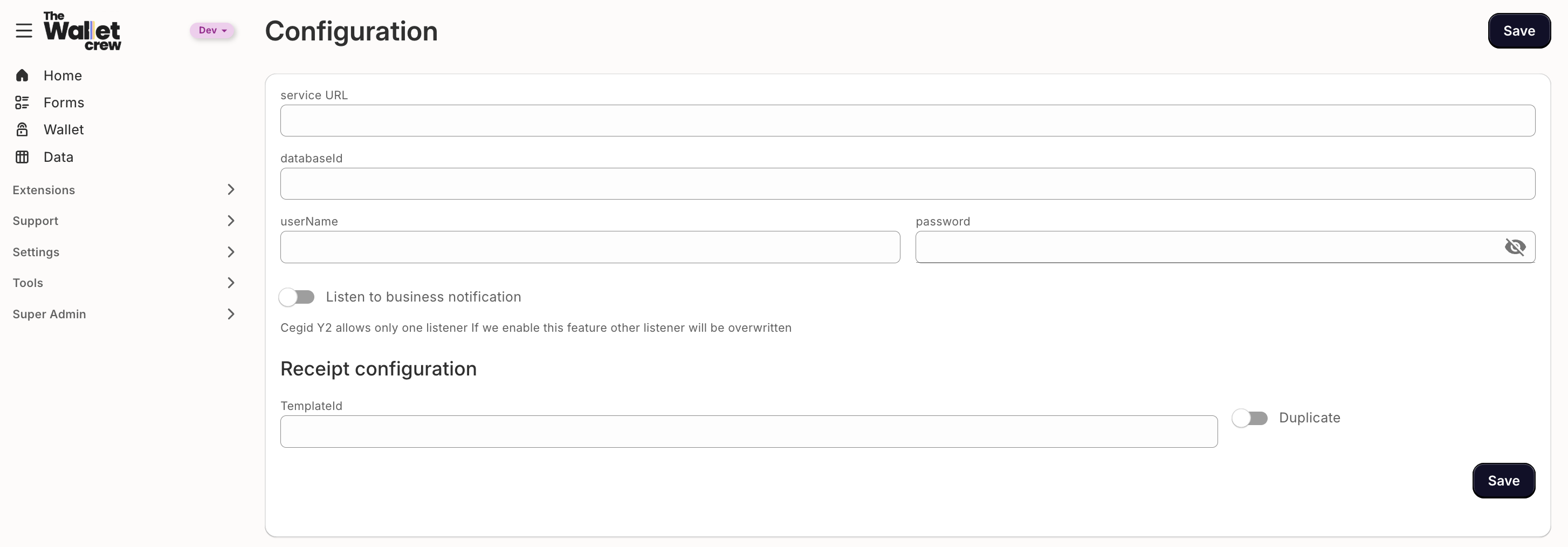
The connector is configured from a dedicated page in the administration console. The page covers the standard settings for a Cegid Retail Y2 wallet integration.
Before starting, confirm that the items in [Cegid-side prerequisites](/connectors/pos/cegid/setup-and-configuration/cegid-side-prerequisites.md) are in place. A connector configured against an unprepared Cegid environment will save successfully and then fail at the first enrolment.
### Where the settings live
The Cegid configuration page is reached from **Integrations → CRM → Cegid** in the administration console. It has two tabs: **Configuration**, covered on this page, and **Mapping**, which holds the customisation script described in [Customise the mapping](/connectors/pos/cegid/customer-data-and-loyalty/customise-the-mapping.md).
Settings take effect on the next call to Cegid. No restart or redeployment is involved.
### Connection settings
A connection is one set of credentials against one Cegid database. Every tenant has at least one, and the page opens on it.
| Field | What to enter |
| --------------- | ------------------------------------------------------------------------------------------------------------------------------------------------------------------------------------------------------------------------------ |
| **Service URL** | The base address hosting the Y2 web services. A trailing `/` is added automatically when it is missing. |
| **Name** | A label for the connection. With a single connection this is conventionally `default`. With several, the name matters — see [Connections and stores](/connectors/pos/cegid/setup-and-configuration/connections-and-stores.md). |
| **Database ID** | The Cegid Y2 database identifier. It is also sent as the folder identifier on the REST endpoints used for receipts. |
| **User name** | The dedicated Y2 web-service user. |
| **Password** | That user's password. |
The connector authenticates over HTTP Basic, presenting the user name qualified by the database. The two fields are combined automatically, so the user name should be entered on its own.
The database identifier is the Cegid Y2 database name, not the service address.
### Receipt configuration
Receipt settings are only relevant where a wallet journey exposes Cegid-generated receipts. **Template ID** selects the Cegid receipt template; leaving it empty uses the Cegid default. **Duplicate** requests a duplicate of an already-issued receipt, and is off unless a journey specifically needs it.
{% hint style="warning" %}
Where several connections exist, receipt settings apply per connection. Configuring them on some and not others produces receipts that differ silently by store.
{% endhint %}
### Business notifications
The **Listen to business notification** toggle, and the user name and password beneath it, control whether The Wallet Crew registers itself as Cegid's notification subscriber.
{% hint style="danger" %}
Cegid Retail Y2 supports a single business notification subscription. Enabling this setting replaces whatever subscription is currently configured in Cegid, which will silently stop any other system that relies on it. Confirm ownership with the Cegid administrator first.
{% endhint %}
The distinction between this setting and the notification endpoint itself is important, and is explained in [Business notifications](/connectors/pos/cegid/events-and-operations/business-notifications.md): the toggle manages the subscription, not the endpoint.
### Advanced settings
The advanced panel holds settings that protect the Cegid environment rather than describing it. **Rate limiting** caps how many requests the connector will make in the Cegid window. **Cache** durations, in seconds, hold Cegid responses briefly to avoid repeating identical reads. **Update customer on pass installation change** controls whether installing or removing a pass writes back to the customer record in Cegid.
What to set each to, and why, is covered in [Advanced configuration](/connectors/pos/cegid/setup-and-configuration/advanced-configuration.md). The defaults are safe: rate limiting on, caching off, installation write-back on.
### Validate the configuration
Saving is not confirmation that the credentials work. The configuration test in the administration console makes a real customer search against every configured connection and reports the result for each one, so a single broken connection in a long list is identified by name rather than by inference.
After the test passes, validate the configuration end to end with a controlled record.
{% stepper %}
{% step %}
#### Enrol a test customer
Complete an enrolment form with test data.
{% endstep %}
{% step %}
#### Confirm the record in Cegid
Check that the profile appears in Cegid Retail Y2, attributed to the expected store.
{% endstep %}
{% step %}
#### Confirm the pass
Check that the expected loyalty data or benefit appears on the resulting pass.
{% endstep %}
{% step %}
#### Confirm real-time updates
Where business notifications are enabled, change the loyalty balance in Cegid and confirm the pass follows.
{% endstep %}
{% endstepper %}
Cegid request consumption is worth watching during this period, particularly where other integrations share the same environment.
### FAQ
Why did the connector stop working after several months?
An expired Cegid service-user password is the most common cause. Renewing it in Cegid and updating the connection restores service. Where the account cannot be exempted from expiry, the renewal date should be tracked.
Should rate limiting be turned off?
No. It exists to keep the connector inside the capacity Cegid allows. Disabling it moves the failure from a managed delay on the Wallet Crew side to rejected requests on the Cegid side, which affects the tills as well.
Can several Cegid databases be configured?
Yes. Connections are added, removed, and defaulted from the connection toolbar on this page. [Connections and stores](/connectors/pos/cegid/setup-and-configuration/connections-and-stores.md) covers when that is needed and how a connection is selected.
Can settings be edited as a file instead?
Yes. The configuration is stored as YAML and can be edited directly in the configuration workspace, which is useful for the few settings the form does not expose. Both routes are safe to mix — see [Advanced configuration](/connectors/pos/cegid/setup-and-configuration/advanced-configuration.md).
---
# Agent Instructions
This documentation is published with GitBook. GitBook is the documentation platform designed so that both humans and AI agents can read, navigate, and reason over technical content effectively. Learn more at gitbook.com.
## Querying This Documentation
If you need additional information that is not directly available in this page, you can query the documentation by asking a question.
Perform an HTTP GET request on the following URL with the `ask` and `goal` query parameters:
```
GET https://docs.thewalletcrew.io/connectors/pos/cegid/setup-and-configuration/connect-with-cegid-retail-y2.md?ask=&goal=
```
`ask` is the immediate question: it should be specific, self-contained, and written in natural language.
`goal` is what the user is ultimately trying to achieve, the reason they need the answer. Sharing it helps GitBook give you a better, more relevant answer. A goal is most helpful when it describes the outcome the user wants rather than restating the question. For example, with `ask=how do I create an API token`, a goal like `automate deployments from our CI pipeline` lets GitBook tailor the answer to that use case.
The response will contain a direct answer to the question and relevant excerpts and sources from the documentation.
Use this mechanism when the answer is not explicitly present in the current page, you need clarification or additional context, or you want to retrieve related documentation sections.