> For the complete documentation index, see [llms.txt](https://docs.thewalletcrew.io/llms.txt). Markdown versions of documentation pages are available by appending `.md` to page URLs; this page is available as [Markdown](https://docs.thewalletcrew.io/connectors/ticketing/secutix/setup.md).
# Setup
Enable The Wallet Crew Secutix connector, configure Secutix web services access, and activate webhooks + email/shop distribution.
Secutix is the ticketing backend. The Wallet Crew adds the wallet layer on top. This setup is about getting a reliable, real-time pipe between both systems. Credentials are configured in The Wallet Crew. The Secutix CSM enables the Secutix side.
### What is needed
The setup requires a Secutix environment that can expose ticket data over web services, and a technical user that The Wallet Crew can use to read that data.
* A Secutix instance with **web services** enabled.
* A **technical user** (operator) for API calls.
* The Secutix CSM, to enable the connector and configure webhooks.
{% hint style="info" %}
Ask the Secutix CSM to provide and validate these values.
{% endhint %}
### Who does what
The Wallet Crew teams usually handle tenant-side enablement. Secutix teams usually handle webhook activation and shop/email changes.
* **The brand or its integrator**: choose the distribution pattern and validate end-to-end flows.
* **The Wallet Crew**: enable the connector, help validate mapping and pass behavior.
* **Secutix CSM**: enable webhooks and assist with ticket shop and email templates.
### Setup steps
{% stepper %}
{% step %}
#### Enable the connector
Ask The Wallet Crew team to enable the **Secutix connector** for the tenant.
{% endstep %}
{% step %}
#### Configure the connector in The Wallet Crew
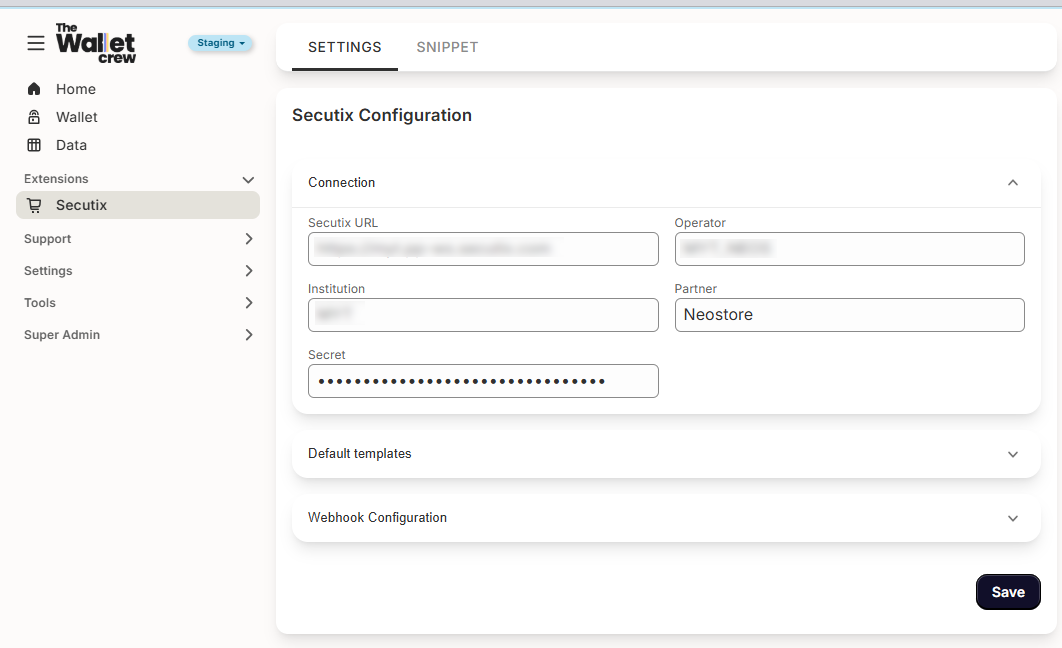
Open the Secutix integration settings in the admin console. These values define how The Wallet Crew authenticates and which Secutix environment it calls.
Check every field against the values supplied by the Secutix CSM before saving.
* **Secutix URL**: web services endpoint
* **Operator**: technical user
* **Institution**: the institution identifier
* **Partner**: keep `Neostore`
* **Secret**: operator password
{% hint style="info" %}
Confirm these values with the Secutix CSM.
{% endhint %}
**Typical URL formats**
* Production: `https://xxx.ws.secutix.com`
* Test: `https://xxx.pp-ws.secutix.com`
On **Save**, The Wallet Crew tests the connection to **Secutix**. If the test fails, an error message is shown.
{% endstep %}
{% step %}
#### Enable the integration in Secutix
Ask the Secutix CSM to handle the Secutix-side work.
* Validate configuration.
* Configure the **webhook** that notifies The Wallet Crew of ticket changes.
* Enable / deploy the **ticket shop** integration.
* Add the **“Add to Wallet”** link in order confirmation emails.
{% endstep %}
{% endstepper %}
When the ticket layout is not configured yet, start with [Wallet pass template & field mapping](/connectors/ticketing/secutix/wallet-pass-template-and-field-mapping.md). When the end-user flow is ready to ship, go to [Distribution](/connectors/ticketing/secutix/distribution.md).
---
# Agent Instructions
This documentation is published with GitBook. GitBook is the documentation platform designed so that both humans and AI agents can read, navigate, and reason over technical content effectively. Learn more at gitbook.com.
## Querying This Documentation
If you need additional information that is not directly available in this page, you can query the documentation dynamically by asking a question.
Perform an HTTP GET request on the current page URL with the `ask` query parameter, and the optional `goal` query parameter:
```
GET https://docs.thewalletcrew.io/connectors/ticketing/secutix/setup.md?ask=&goal=
```
`ask` is the immediate question: it should be specific, self-contained, and written in natural language.
`goal` is optional and describes the broader end goal you are ultimately trying to accomplish on behalf of the user. GitBook uses it to tailor the answer towards what is most useful for that goal.
The response will contain a direct answer to the question and relevant excerpts and sources from the documentation.
Use this mechanism when the answer is not explicitly present in the current page, you need clarification or additional context, or you want to retrieve related documentation sections.