> For the complete documentation index, see [llms.txt](https://docs.thewalletcrew.io/llms.txt). Markdown versions of documentation pages are available by appending `.md` to page URLs; this page is available as [Markdown](https://docs.thewalletcrew.io/connectors/ticketing/secutix/wallet-pass-template-and-field-mapping.md).
# Wallet pass template & field mapping
Create the Event Ticket template and map Secutix ticket data into Apple Wallet and Google Wallet.
The wallet template defines what attendees see at the gate. Field mapping defines which Secutix data ends up in each wallet field. Start simple. Get barcode, event name, date, venue, and seat right. Add extra fields only when their purpose is clear.
## Create the Event Ticket template
A template is the “model” of the ticket in Apple Wallet and Google Wallet. It is what makes the pass look like the brand, and what decides which pieces of information are shown to the attendee.
It is created once, then reused for every issued ticket. Most teams start with a single Event Ticket template. Even with small variations, one template is often enough, because the template engine supports variables and conditions in every customizable field, including colors and images.
More templates are only needed when some tickets require a completely different look or different content. For the longer explanation, see [Pass types & templates](/guides-design/design/pass-types-and-templates.md).
Real-world use cases
Use multiple templates when a clearly different layout or set of fields is required.
* **Different product types:** a template for a **visit pass**, another for an **event ticket**, and another for a **season ticket**.
* **Different rooms / halls:** one template per room in a multi-room venue, so the pass highlights the right room name and entry info.
* **Venue configuration changes:** different templates when the same place has different setups (seated, standing, in-the-round).
* **Numbered vs free placement:** one template that shows **section/row/seat**, and another that focuses on **free seating**.
* **Different access experiences:** different templates when some shows need extra instructions (VIP entrance, early access, specific gate flow).
{% stepper %}
{% step %}
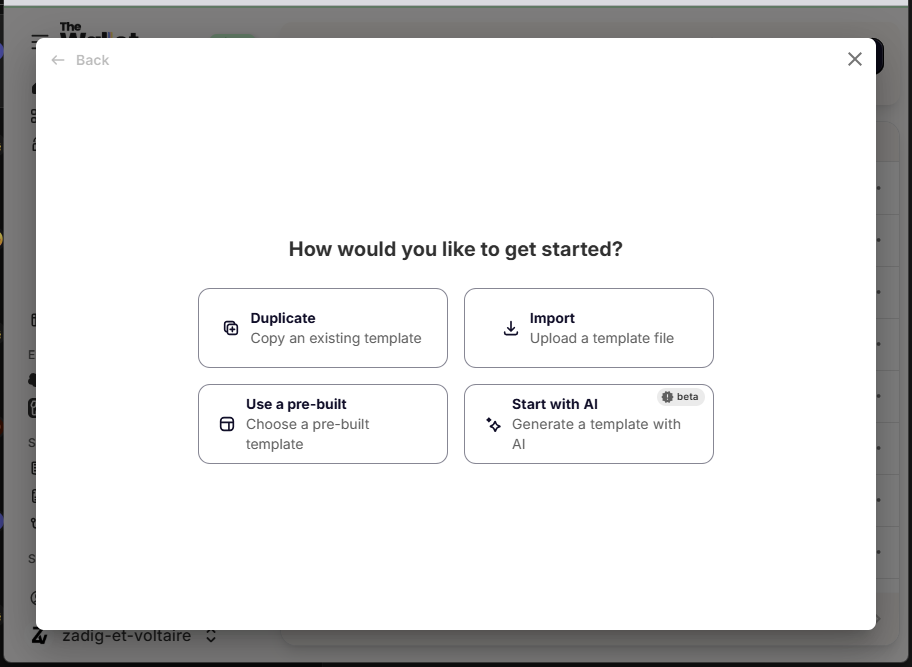
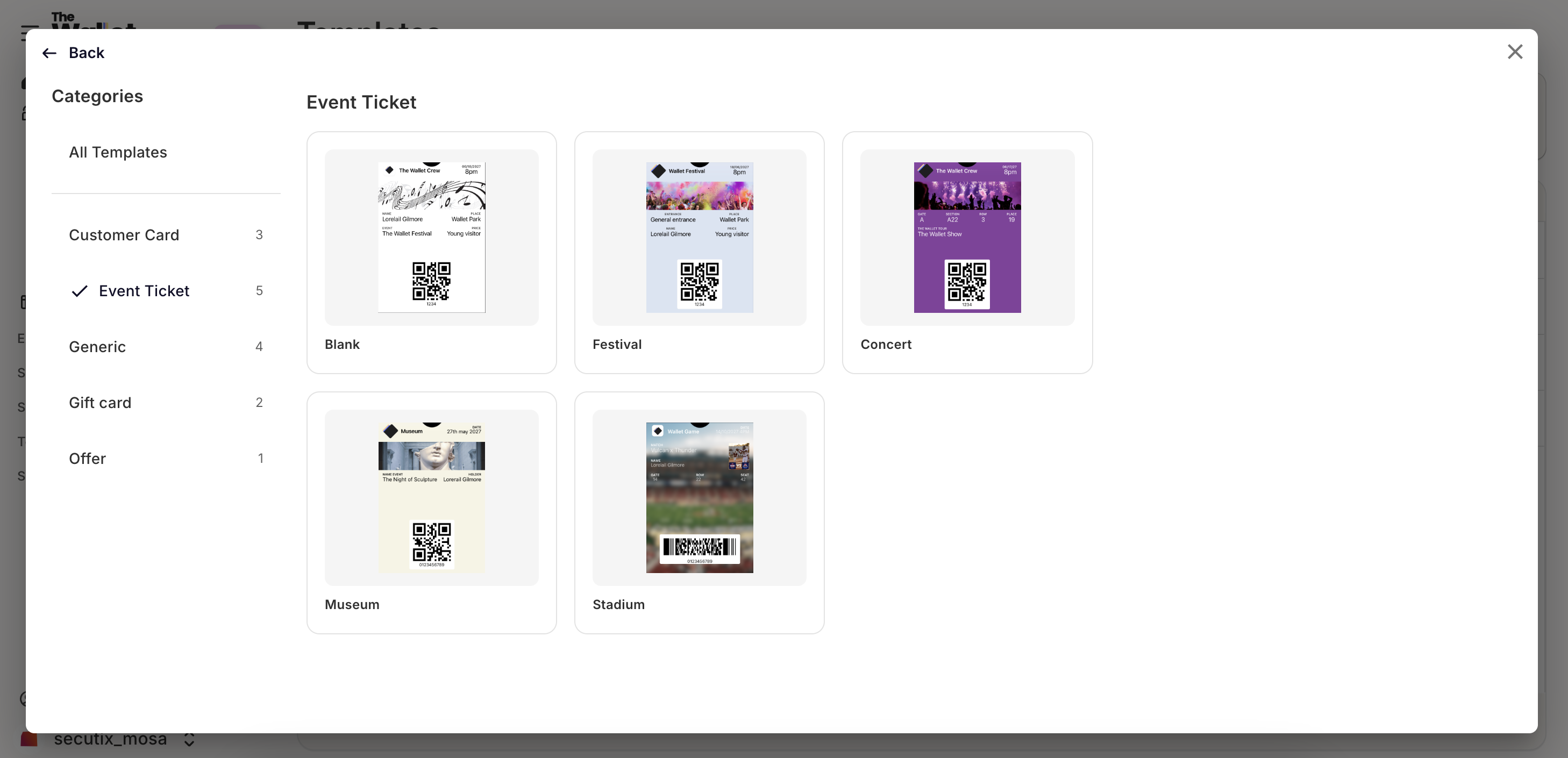
#### Create a new template
Pick the Event ticket template when creating the pass.
{% endstep %}
{% step %}
#### Set the template name
Template naming matters. Secutix can target templates by name during distribution. When several templates are planned, set up routing rules in [Template selection (routing)](/connectors/ticketing/secutix/template-selection.md).
{% endstep %}
{% endstepper %}
## Field mapping
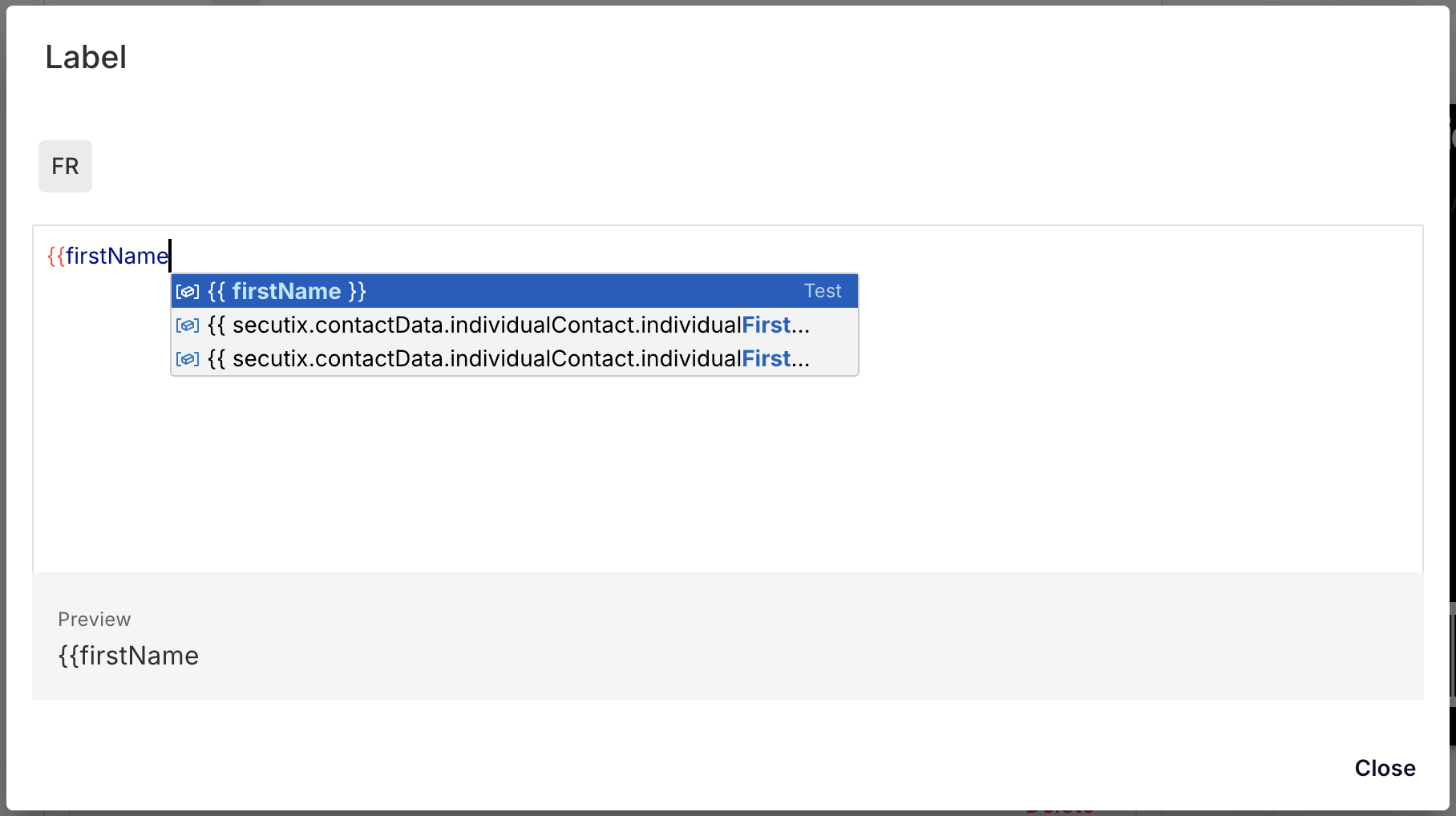
The connector maps the most common ticket fields by default. In the template, open the advanced configuration editor to browse available Secutix data with autocomplete. Use the field list below to plan the mapping and debug values.
Field mapping UI with Secutix autocomplete.
Use this page to:
* Confirm which Secutix fields are available.
* Add extra computed fields to the pass payload.
* Debug which ticket fields can be reused in the template.
To learn more about ticket template configuration, see [Event ticket](/guides-design/design/event-ticket.md).
### Available fields
Available fields (full list)
This is the raw field catalog exposed by the connector. Treat it as a toolbox. It is rarely needed in full.
| The Wallet Crew | Secutix | Example |
| -------------------- | ----------------------------------------------------------------------------------- | --------------------------------------------- |
| firstName | movementData.beneficiaryFirstname | Cyril |
| lastName | movementData.beneficiaryLastname | DURAND |
| barCode | movementData.barCode | 085035041335220306680099 |
| ticket.zone3 | movementData.area | Single Zone |
| ticket.seatCategory | movementData.seatCategory | Single Category |
| address.country | operationData.siteAddress.countryCode | FR |
| address.address | operationData.siteAddress.firstAddressLine | 116, Avenue du Président Kennedy |
| address.city | operationData.siteAddress.locality | PARIS |
| | operationData.siteAddress.phoneNumber | 33-0156401516 |
| | operationData.siteAddress.webSite | |
| address.zipCode | operationData.siteAddress.zipCode | 75016 |
| ticket.zone1 | operationData.site | House of Radio and Music |
| ticket.zone2 | operationData.space | Studio 104 |
| ticket.price | operationData.totalAmount | 0 |
| ticket.name | operationData.performance | Wallet Show |
| ticket.subName | operationData.performanceAddOnName | An exceptional show |
| ticket.startDate | operationData.performanceDate | 2024-07-01T20:00:00.000+02:00 |
| | operationData.product | Wallet Show |
| | operationData.productFamilyType | SINGLE\_ENTRY |
| | operationData.productFamilySubType | SIMPLE\_TICKET |
| ticket.taxNumber | movementData.TaxNumber | 12010124729 |
| expirationDate | expirationDate | 2024-02-23T00:03:46.627+01:00 |
| ticket.orderId | orderId | 2389856 |
| ticket.contactId | contactReference | 897501 |
| ticket.fileId | operationData.fileId | 2234582 |
| ticket.zone5 | movementData.row | |
| ticket.seatNumber | movementData.seatNumber | |
| ticket.zone4 | movementData.block | |
| ticket.priceCategory | operation.AudienceSubCategory | |
| ticket.priceCurrency | operation.CatalogCurrency.CurrencyCode | |
| ticket.eventId | operationData.eventId | |
| ticket.entrance | operationData.entrance | |
| ticket.entranceCode | operationData.entranceCode | |
| ticket.floor | operationData.floor | |
| ticket.seatQuality | operationData.seatQuality | |
| ticket.sector | operationData.sector | |
| ticket.canceled | movementTicketData.TicketState is INVALIDATED or CANCELLED | |
| address.longitude | operationData.siteAddress.gpsLongitude or computed from address via Google Maps API | |
| address.latitude | operationData.siteAddress.gpsLatitude or computed from address via Google Maps API | |
## Mapping customization (advanced)
Use scripting only when the default field catalog is not enough. Add a custom script in the **Advanced** tab of the Secutix configuration page.
This is useful to:
* Map a Secutix value that is not exposed yet.
* Build a computed field (format, concatenation, conditional value).
* Normalize values so templates stay clean (example: always output a single “entranceLabel” field).
Register `extensions.secutix.movement.mapper` and implement `MapFromSecutix`.
```javascript
/**
* Extend the default mapping from Secutix to Wallet Crew.
*
* Add any extra fields on `entity`. They become available for template rendering.
*
* @param {Object} params
* @param {Object} params.Movement - Movement information from Secutix Web Service.
* @param {Object} params.Operation- Operation information related to the current Movement from Secutix Web Service.
* @param {Object|null|undefined} params.Product - Nullable product information related to the current Movement from Secutix.
* @param {Object} entity - Target wallet entity to enrich.
*/
function mapFromSecutix(data, entity) {
// Example: expose a Secutix field as an extra wallet field
const stageVisibility = data?.Movement?.StageVisibility;
if (stageVisibility != null) {
entity["ticket.stageVisibility"] = stageVisibility;
}
}
export default function(context) {
context.register('extensions.secutix.movement.mapper', {
MapFromSecutix: mapFromSecutix
});
}
```
When several ticket templates are planned, configure routing rules in [Template selection (routing)](/connectors/ticketing/secutix/template-selection.md).
---
# Agent Instructions
This documentation is published with GitBook. GitBook is the documentation platform designed so that both humans and AI agents can read, navigate, and reason over technical content effectively. Learn more at gitbook.com.
## Querying This Documentation
If you need additional information that is not directly available in this page, you can query the documentation dynamically by asking a question.
Perform an HTTP GET request on the current page URL with the `ask` query parameter, and the optional `goal` query parameter:
```
GET https://docs.thewalletcrew.io/connectors/ticketing/secutix/wallet-pass-template-and-field-mapping.md?ask=&goal=
```
`ask` is the immediate question: it should be specific, self-contained, and written in natural language.
`goal` is optional and describes the broader end goal you are ultimately trying to accomplish on behalf of the user. GitBook uses it to tailor the answer towards what is most useful for that goal.
The response will contain a direct answer to the question and relevant excerpts and sources from the documentation.
Use this mechanism when the answer is not explicitly present in the current page, you need clarification or additional context, or you want to retrieve related documentation sections.